KVS NVS Form Correction 2025: Date, Window, Process
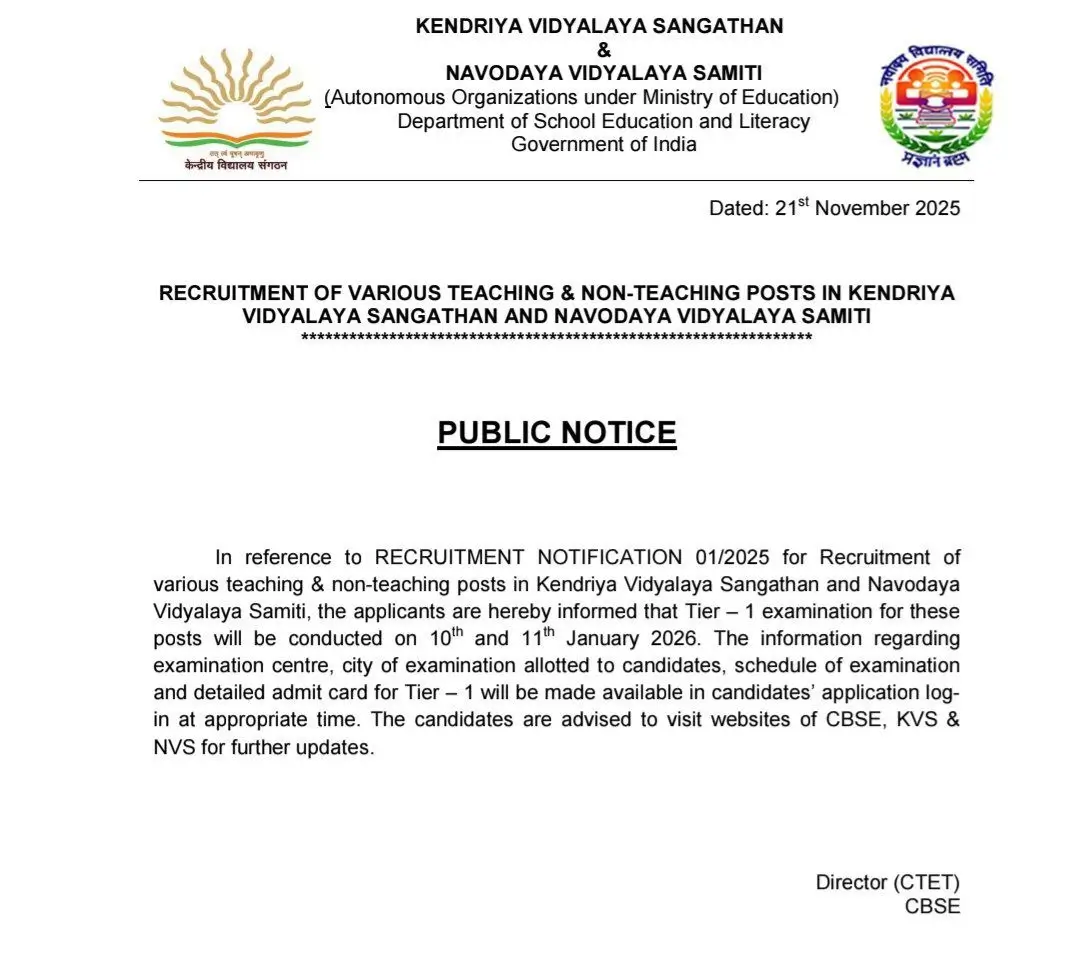
Official Notice – KVS/NVS Recruitment 2025
The short-notification for KVS & NVS Teaching and Non-Teaching Recruitment 2025 has been released. Candidates who applied between 14 November 2025 and 4 December 2025 should carefully check whether a form-correction window has been announced by the authorities for their post. Replace the placeholder image below with the official PDF/notice screenshot for your post.
Quick summary (what this page covers)
This guide explains everything you need to know about the KVS NVS Form Correction 2025 — important dates, how to access the correction window (if released), step-by-step correction process with screenshots placeholders, what fields are usually editable, fees and document updates, common mistakes to avoid and a helpful FAQ at the end.
Key facts at a glance
| Recruitment | KVS & NVS Teaching and Non-Teaching Recruitment (Advt. No. 01/2025) |
|---|---|
| Total Vacancies (Announced) | 14,967 (KVS – 9,126; NVS – 5,841) |
| Online Application Window | 14 November 2025 – 4 December 2025 |
| Exam Date (Tentative) | 10 & 11 January 2026 (as per notification) |
| Correction Window | 13 December To 15 December 2025 |
| Official Websites | cbse.gov.in | kvsangathan.nic.in | navodaya.gov.in |
What is a form correction window and why it matters
The form correction window is a short period after the application deadline when the exam authority (CBSE/KVS/NVS/recruitment agency) allows candidates to correct specific mistakes made while filling the online application form. Commonly allowed edits include spelling corrections, change of photograph/signature if it failed format checks, or modification of certain non-critical fields. Important personal fields (like category, date of birth, or educational qualification) may or may not be editable — it depends on the authority’s policy for that recruitment.
Typical fields allowed in correction window
From previous national recruitments, these fields are frequently allowed for correction (subject to the official notice):
- Candidate name spelling (minor corrections)
- Father / mother name (minor corrections)
- Date of birth (in limited and documented cases)
- Photograph and signature (image re-upload)
- Contact details: Mobile number, Email address, Communication address
- Education details (only if the authority explicitly allows and if supporting documents are re-uploaded)
- Exam center preference (sometimes)
Fields usually NOT allowed to change (most recruitments)
- Category (SC/ST/OBC/EWS) — unless special provision or verification permitted
- Community / caste details once finalized (document verification stage may handle corrections)
- Post applied for (usually fixed)
- Bank details for fee refunds (in many cases locked)
Form Correction 2025 — Likely dates & timeline
As of the short-notification release, the application window closed on 4 December 2025. The recruitment authority usually publishes correction-window dates after the form close or together with the detailed notification. If a correction window is provided, expect the timeline below (typical sequence):
| Event | Expected / Typical Time |
|---|---|
| Application window | 14 Nov 2025 – 4 Dec 2025 |
| Correction window (if issued) | Usually 1–10 days after application closing (watch official portal) |
| Last date for fee payment (if different) | As published in notification (check portal) |
| Admit card release | Usually a few weeks before exam (tentative: Jan 2026) |
How to know when the official correction window opens
Follow these quick steps to be first to know:
- Visit the official recruitment portal frequently: kvsangathan.nic.in and cbse.gov.in.
- Check the “Recruitment / Notification / What’s New” section on the website daily.
- Download the detailed notification PDF and read the section titled “Important Dates / Corrigendum / Correction Facility”.
- Subscribe or follow reliable education portals and news feeds (but always verify with the official site).
Step-by-step: How to perform form correction (standard online procedure)
Step 1 — Login to the Recruitment Portal
- Open the official recruitment website (the exact recruitment portal link will be in the notification). Example portal: Examination Services Login page.
- Click on “Login” or “Candidate’s Login” and enter your registration/application number, date of birth and password (or OTP).
Step 2 — Find the Correction Link
After login, you will usually see a menu item labelled “Form Correction / Edit Application / Modify Application” — click that. If the correction window is not active, the link will either be disabled or absent.
Step 3 — Make permitted corrections
- Only fields open for correction will be editable. Carefully change the allowed fields — do not alter fields unless necessary.
- If image re-upload is allowed, ensure your photograph and signature meet the file size and dimension rules described in the notification (commonly JPG/JPEG, specified dimensions and size limit).
- For spelling changes, use correct spellings as per official ID documents (Aadhaar/PAN/birth certificate/10th marksheet).
Step 4 — Upload supporting documents (if required)
Some corrections (for example, DOB or qualification) may require you to upload scanned supporting documents. Keep scanned PDFs/JPEGs ready and ensure they are clear and within the size limit.
Step 5 — Preview & Save
Preview the changes carefully. Some portals provide a system-generated acknowledgement after saving changes — download and save the acknowledgement / corrected application copy as PDF.
Step 6 — Payment (if applicable)
If the portal charges a nominal fee for correction or if the corrections require re-submission of fees, complete payment using the gateway provided and keep the receipt.
Step 7 — Note the confirmation number
After successful correction, the portal will generate an updated application/acknowledgement number or correction reference. Save this for future reference and during document verification.
Common mistakes & how to avoid them
- Rushing corrections: Don’t make multiple random edits — fix only what’s necessary.
- Wrong document upload: Ensure uploaded documents are correct and legible.
- Ignoring image specs: Images that don’t meet size/resolution cause rejection — follow specs exactly.
- Not saving acknowledgement: Always download the corrected form copy & payment receipt (if any).
- Waiting till the last hour: Portal slowdowns and payment gateway errors are common on last days — act early.
Example scenarios — what you can/can’t expect
| Scenario | Likely Outcome |
|---|---|
| Wrong photograph uploaded | Usually allowed — you can re-upload clear photo during correction window. |
| Birth date typo | May be allowed but authorities often ask supporting proof; possible follow-up at verification stage. |
| Wrong category selected | Usually not allowed to change in correction window — may require proof and special request during document verification. |
| Mobile no / email incorrect | Often allowed — update immediately to receive admit cards & OTPs. |
Checklist — Documents & images to keep ready for correction
- Scanned passport-size photo (as per notification dimensions)
- Scanned signature (as per format)
- Scanned 10th / 12th / Graduation certificates (if needed)
- Proof for DOB (birth certificate / 10th marksheet)
- Caste certificate (if changing or to support claims)
- Government photo ID (Aadhaar, PAN, Passport)
Will a correction attract a fee?
Most exam authorities allow simple corrections (photo, mobile no, name spellings) free of cost. However, some portals may require a small fee for certain corrections or for re-submission of the application. Always check the correction notice for any fee details. Keep fee payment receipts safely.
After correction — Document verification & final advice
Any correction you make online will be verified later during the document verification stage (if you are shortlisted). Make sure the final online application exactly matches your supporting documents — discrepancies can lead to rejection. If a critical field like category or DOB was changed online, be prepared to submit hard proofs during verification.
Frequently Asked Questions (FAQ)
Q: When will KVS/NVS open the correction window?
A: The authority usually notifies correction dates after the application closing date. Keep checking the official portal and notification PDF for a formal announcement.
Q: Can I change the post I applied for during correction?
A: Typically no. Post applied for is usually fixed unless the notification explicitly allows change.
Q: I made a mistake in DOB — what should I do?
A: If correction window allows DOB edit, update with supporting proof. If not allowed, contact the helpdesk and keep your original documents ready for verification stage.
Q: I didn’t receive OTP — can I correct mobile number?
A: Mobile number change is commonly allowed; use correction window to update it so you receive admit card & OTPs.
Q: Will corrections be accepted after the window closes?
A: Generally no. In exceptional circumstances, the authority may allow rectification during document verification or via written request, but rely only on official communications.
Helpdesk — whom to contact
When in doubt, contact the recruitment portal helpdesk or the email/phone number provided in the official notification. Do not rely on unverified social posts. Keep screenshots and copies of all your application and correction acknowledgements when you contact helpdesk.
| How to contact | Information |
|---|---|
| Official portal / recruitment page | kvsangathan.nic.in / cbse.gov.in / recruitment portal login |
| Helpdesk (portal-based) | Use the "Contact us / Helpdesk" section on the recruitment portal |
| Email / Phone | As specified in the notification PDF — always quote your application number |
Conclusion — best practice checklist
- Monitor official portal for any correction-window announcement (immediately after form close).
- Keep scanned images and proofs ready in the correct format.
- Make only necessary changes and save the acknowledgement PDF.
- Keep records of payments and screenshots of confirmations.
- During document verification stage, present only original supporting documents that match the corrected application.
